
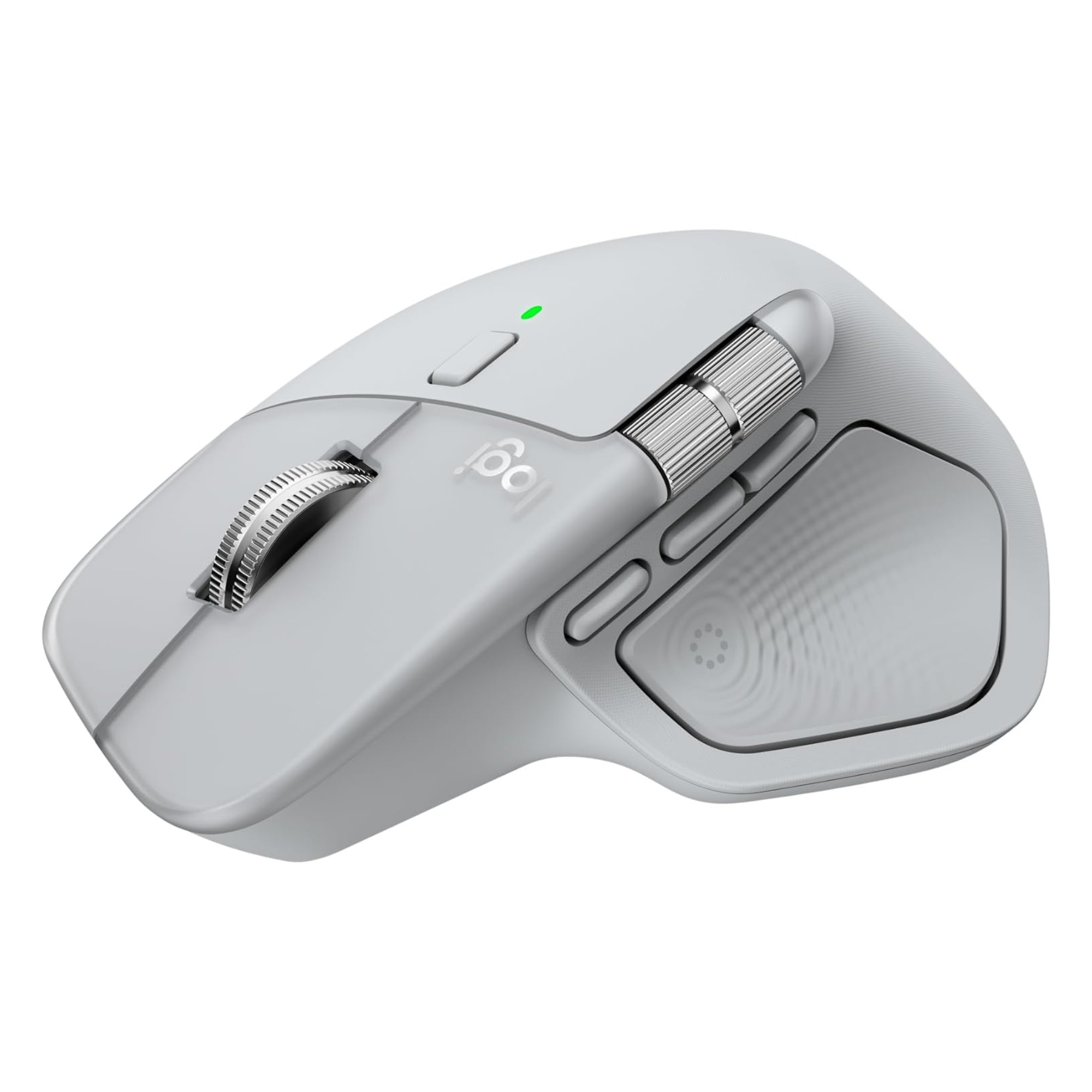
Logitech MX Master 4 Wireless Mouse
Introduction
Logitech MX Master series is popular due to its advanced features such as multi-computer support and control, fast mag-speed scrolling and for heavy apps extensive customization control ! The latest edition from this line-up is Logitech MX Master 4 Mouse, this introduces new extra features like it increases the wireless connectivity by 2X and its Action Ring feature provides 8 quick on-screen shortcuts in one click around cursor of mouse that reduces work completion time by 33%. It is best option for the users who require advanced shortcuts, multi-device connectivity and Ergonomic comfort throughout the day.
Battery Life
70+ days
Weight
150g
Device Support
3
Logitech MX Master 4: Key Specifications
Connectivity
Bluetooth & Logi Bolt USB-C
DPI
Up to 8,000 DPI
Custom Button
Yes
Battery Life
Up to 70 Days
Charging
USB-C Fast Charging
Multi-Device Support
Up to 3 Devices
Compatibility
Windows, macOS, Linux, iPadOS
Weight
Approx. 150g
Comfort and Ergonomics
Long Hour Productivity
- This mouse has an ergonomic thumb wing that is designed for thumb rest, which provides comfort to hand and prevents from dragging on desk
- It has a tilt angle design that keeps forearm and wrist in natural position that reduces strain and prevent from cramping due to long time use
Hand Size Compatibility
- Large Hands – For large hands this mouse provides excellent support to palm and thumb, that reduces pain during long days use.
- Medium Hands – For Medium Sized hands, this mouse fills the palm comfortably that provides natural access to main buttons and the horizontal scroll wheel.
- Small Hands – This mouse is not a good option for small hands users, because with small hands it becomes difficult to reach side buttons and scroll wheel.
Who may not like it
- For competitive gaming users because it’s weight is around 150 gm, due to which there is delay in click and sensor response during fast speed movement.
- Users with small hands faces difficulty in its use because with small hand it is difficult to reach side buttons.
- Those who prefer lightweight mouse, may feel it heavy, because it’s weight is around 150 gm that is heavier than regular normal mouse.
Design & Build Quality
Premium yet familiar design
- It’s design remains ergonomic that naturally supports palm by making wrist relax and neutral position of hand
- It is available in premium colors – such as Graphite, Pale Grey and Mac-specific variants.
Build Quality Improvement
- The Rubberized coating, which gets degrade by time is replaced by hard plastic with silicone grip that makes it durable for long time.
- In its scroll wheels aerospace grade aluminium is used especially in Mag-speed Smart scroll wheel and in Horizontal Thumb Wheel that gives it a premium look.
- It’s main switch gives premium vibe that are 90% quitter then older models, it’s clicking experience is satisfying and reduce disturbance.
What's New in Logitech MX Master 4?
Haptic Feedback System
The ergonomic thumb rest now features a touch sensitive panel that provides physical vibration to indicate the actions like triggering “Action Ring”, adjusting slider or app specific commands are completed.
Actions Ring Feature
Action ring is on-screen menu that appears after clicking on haptic panel. This gives you access of tools, filters and smart actions around the cursor on screen in one click. This saves your menu navigation time.
Stronger Wireless Connectivity
It features upgraded radio chips, optimized antenna placement, and a new USB C Bolt receiver that makes connectivity twice as powerful
Quieter Clicks
The Quiet Click features is even more upgrade to make click quieter than Logitech MX Master 3S. It helps reducing the disturbance.
Performance and Tracking
8,000 DPI Sensor
This mouse features 8000 DPI Sensor that allows tracking on any surface. Whether you use it on glass, polished desk or wood, it works on any surface smoothly
MagSpeed Scroll Wheel
It has a hyper-fast free-spin mode that is capable in scrolling 1000 lines per second.
Horizontal Scroll Wheel
This mouse has a thumb wheel for horizontal scrolling which is used in side by side scrolling. This is placed above the thumb rest and near the back/ forward buttons. It is commonly used in excel spreadsheet and in long video editing.
Battery Life and Charging
The Company claims that The Logitech MX master 4 can last up to 70 after full charge, but in real life battery performance depends on usage.
Real-World Battery Performance
- Low Power Mode (70+ Days): If its haptic feedback is turned off and auto sleep mode is turned on and only Bluetooth is used for connectivity, then its battery can last up to 70+ days on full charge.
- Standard Usage (40–68 Days): If it is used for 6-8 hours with medium intensity haptic feedback and using a standard Bluetooth connection, its battery can lasts up to 2 months after full charge.
- High Usage (40–45 Days): If it is used with more than 10-12 hours and using the haptic panel with maximum intensity and using Logi Bolt USB receiver, then battery will drain before 40 days after full charge.
Fast Charging Performance
Logitech MX Master 4 has a great fast charging feature in which 1 minute quick charging provides 3 hours continuous battery life, that can be used in emergency.
Logitech MX Master 4 vs MX Master 3S
| Feature | Logitech MX Master 4 | Logitech MX Master 3S |
|---|---|---|
| Sensor | 8,000 DPI | 8,000 DPI |
| Battery Life | Up to 70 Days | Up to 70 Days |
| Charging | USB-C Fast Charging | USB-C Fast Charging |
| Multi-Device Support | Up to 3 Devices | Up to 3 Devices |
| MagSpeed Scroll Wheel | Yes | Yes |
| Haptic Feedback | ✅ Yes | ❌ No |
| Action Ring | ✅ Yes | ❌ No |
| Extra Gesture Button | ✅ Yes | ❌ No |
| Clicks | Quieter | Quiet |
| Surface Material | Hard Plastic + Silicone Grip | Rubberized Coating |
| Weight | ≈152g | ≈141g |
| Best For | Power Users & Professionals | Value-Oriented Productivity Users |
Logitech MX Master 4: Gaming Performance
Casual Gaming
This mouse is not made for gaming because it has some limitation for gaming, but you can used it for casual Gaming. You can play these games easily-
- Strategy Games
- Simulation Games
- MMO Games
- Offline Games
Competitive Gaming Limitations
- This Mouse comes with a 125 Hz polling rate means it gives updates to computer by 125 times per second. This is low polling rate for gaming, Due to which cursor movement becomes inconsistent and choppy.
- This Mouse has high Click latency and Sensor Latency, that affect aiming and reflexes in competitive gaming.
- This Mouse weighs around 150 gm, which is heavier for gaming because in fast-paced movement it cause hand fatigue.
Pros
- Outstanding Ergonomics design
- Long-lasting battery life
- New Haptic feedback system
- Premium Build Quality
- Quiet clicks
Cons
- Price is expensive
- Design is right handed focused
- Some of the features requires software installation.
- Heavy for gamers
Who Should Buy Logitech MX Master 4?
Ideal For
- Remote workers
- Office professionals
- Programmers
- Content creators
- Designers
- Video editors
Not Ideal For
- Competitive gamers
- Left-handed users
- Budget shoppers
Frequently Asked Questions (FAQ)
Does MX Master 4 work with Mac and Windows?
Yes, Logitech MX Master 4 works smoothly in both Windows and Mac.
Can MX Master 4 connect to multiple devices?
Yes, you can connect this with up to 3 devices and can switch them instantly.
How long does the battery last?
Once fully charged, it can lasts up to 70 days, on 1 minute charge can lasts up to 3 hours.
Is MX Master 4 good for gaming?
The Logitech MX Master 4 is not recommended for gaming.
Does it work on glass surfaces?
Yes it can works on glass without needing a mouse pad.
Final Verdict
If you are looking for a mouse that is comfortable for long time use and useful in saving half of time of work due to its shortcuts features, then Logitech MX Master 4 will be good option for you.