
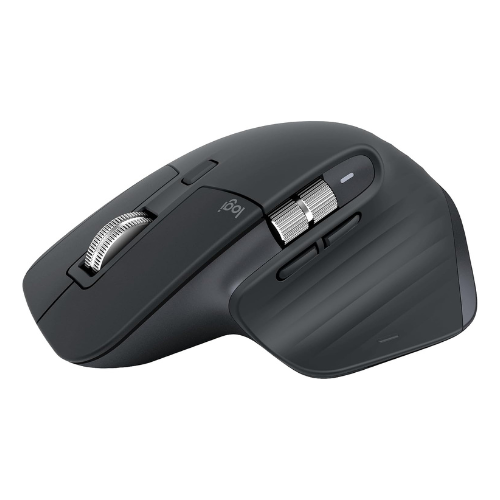
Logitech MX Master 3S Wireless Mouse
Launch Year
2022
Weight
141g
Connectivity
2.4GHz wireless + Bluetooth
Maximum DPI
8000 DPI
Introduction
The Logitech MX Master 3S Wireless Mouse is a premium, right-handed ergonomic mouse designed primarily for office work, productivity, programming, and creative tasks. Its large shape, 9.5/10 comfort score, magnetic scroll wheel, rechargeable battery, and USB-C charging make it a strong option for users who spend long hours working at a computer.
At the listed price of $79.99, it offers a compelling productivity-focused feature set. However, its 141 g weight, 125 Hz maximum polling rate, lack of wired mode, and low fingertip-grip score make it less suitable for competitive gaming or users who prefer lightweight mice.
Best for: Office professionals, programmers, productivity-focused users, and creative workers.
Less suitable for: Competitive gamers, fingertip-grip users, and people looking for a lightweight or ambidextrous mouse.
Logitech MX Master 3S: Specifications
| Specification | Details |
|---|---|
| Brand | Logitech |
| Model | MX Master 3S |
| Launch year | 2022 |
| MSRP | $99 |
| Current price | $79.99 |
| Availability | Available |
| Weight | 141 g |
| Dimensions | 124.9 × 84.3 × 51 mm |
| Weight category | Very Heavy |
| Size category | Large |
| Shape | Ergonomic |
| Handedness | Right |
| Shell material | ABS Plastic |
| Shell finish | Matte |
| Sensor | Darkfield High Precision |
| Sensor type | Optical |
| Maximum DPI | 8000 |
| Maximum polling rate | 125Hz |
| Motion Sync | No |
| Buttons | 7 |
| Main switch | Mechanical |
| Wheel tilt | No |
| Connectivity | Bluetooth + 2.4GHz Wireless |
| Wired mode | No |
| Battery | Rechargeable |
| Battery life | 70 Days |
| Charging | USB C |
| Software | Logi Options+ |
| Onboard memory | No |
| RGB | No |
Design and Build Quality
The Logitech MX Master 3S uses a large, ergonomic design intended for right-handed users. Its dimensions of 124.9 × 84.3 × 51 mm provide a substantial body that may suit people who prefer a mouse with more space for their hand.
The shell uses ABS plastic with a matte finish. Its build quality score is 9/10, suggesting a strong overall assessment.
Its shape prioritizes comfort and everyday usability rather than minimal weight or a symmetrical design.
The main trade-off is size. Users with smaller hands may find it less natural to handle than a compact mouse, while those who prefer larger ergonomic designs may appreciate its form.
Weight and Size
At 141 grams, the MX Master 3S falls into the Very Heavy category.
This weight may appeal to users who prefer a substantial mouse for everyday desktop work. However, people who frequently lift and reposition their mouse or make fast, repeated movements may prefer a lighter model.
Its large size also affects who is likely to find it comfortable.
- Small hands: 5/10 fit score
- Medium hands: 8/10 fit score
- Large hands: 9/10 fit score
These ratings suggest that the MX Master 3S is better suited to medium and large hands than to smaller hands.
Ergonomics and Comfort
Comfort is one of the strongest area of this mouse
The high scores make it a promising candidate for people who use a mouse throughout the workday. Its ergonomic shape and large body are consistent with its productivity-oriented positioning.
However, comfort is personal. Hand size, grip style, desk setup, and individual preferences all influence whether a mouse feels comfortable. These ratings should not be interpreted as a guarantee of pain prevention or a medical benefit.
| Grip Style | Score |
|---|---|
| Palm Grip | 9.5/10 |
| Claw Grip | 8/10 |
| Fingertip Grip | 3/10 |
The palm grip receives the highest score, followed by the claw grip. The low fingertip-grip score suggests that users who control a mouse mainly with their fingertips may want to consider a smaller, lighter alternative.
Sensor Performance
The MX Master 3S uses the Darkfield High Precision optical sensor, with maximum sensitivity of 8,000 DPI.
DPI describes how far the pointer moves relative to physical mouse movement. A higher maximum DPI provides more sensitivity options, but it does not automatically make a mouse more accurate or better for every user. It also has:
- Maximum polling rate: 125 Hz
- Motion Sync: No
The 125 Hz polling rate is one reason this mouse is better positioned for everyday productivity than competitive gaming. Users who prioritize high polling rates and fast-response gaming equipment may want to compare gaming-focused alternatives.
Buttons
The MX Master 3S has seven buttons and mechanical main switches.
Additional buttons can be useful for users who want shortcuts available directly on the mouse rather than relying entirely on keyboard commands. Their usefulness depends on the applications and workflows a person uses.
The mouse supports Logi Options+. Users considering it for a specialized workflow should check that the customizations they need are supported by their operating system and applications.
Scroll Wheel
The MX Master 3S features a magnetic scroll wheel.
For productivity users, scrolling is an important part of navigating long documents, spreadsheets, web pages, and other content. A dedicated scroll-wheel design can be particularly relevant for people who work with large amounts of information throughout the day.
Also the wheel does not support tilt.
Wireless Connectivity
The MX Master 3S supports two wireless connection types:
- 2.4 GHz wireless
- Bluetooth
This gives users options for connecting the mouse to compatible devices without relying on a wired connection. One important limitation is that there is no wired operating mode. Although the mouse charges through USB-C, charging connectivity should not be confused with the ability to operate as a wired mouse.
If you specifically need a mouse that continues to work through a USB cable, verify that requirement before buying.
Battery and Charging
This mouse has rechargeable battery with a battery-life figure of 70 days and USB-C charging.
For people who prefer rechargeable peripherals, this can reduce the need to replace disposable batteries. The actual time between charges will depend on usage and other operating conditions.
Software
| Operating System | Support |
|---|---|
| Windows | Yes |
| macOS | Full |
| Linux | Basic |
The mouse is a potential option for users who want to integrate a mouse into a productivity workflow. However, there is no onboard memory, so users who need settings stored directly on the mouse should investigate this limitation.
Linux users should also verify the availability of any required configuration features before purchasing.
Office, Programming, and Creative Work
For office work
Its ergonomic design, wireless connectivity, and magnetic scroll wheel make it worth considering for general desktop work.
For programming
The programming score of 9.5/10 makes it a strong candidate for developers who spend extended periods navigating code, documentation, and multiple applications.
For creative work
The creative-work score is also 9.5/10. Whether it suits a specific creative application depends on the user’s workflow and the controls they require.
For gaming
The gaming score is 5/10. Its 141 g weight and 125 Hz maximum polling rate make it a less compelling choice for competitive gaming than a mouse designed specifically for that purpose.
It can still be considered for casual use, but gaming-focused buyers should compare other options based on their requirements.
Where to Buy?
You can buy this mouse from trusted platform like:
- Logitech’s Official Website
- Amazon
- Other Trusted online platform.
Pros and Cons
Pros
High comfort and ergonomics scores
Large, right-handed ergonomic design
2.4 GHz wireless and Bluetooth
Magnetic scroll wheel
Rechargeable battery with USB-C charging
Strong productivity and programming ratings
Cons
Heavy at 141 g
Large design may not suit small hands
Low fingertip-grip score
Maximum polling rate of 125 Hz
No wired operating mode.
No onboard memory or RGB lighting
Who Should Buy the Logitech MX Master 3S?
The MX Master 3S may be a good fit if you:
- Want an ergonomic mouse for long work sessions.
- Prefer a large mouse and mainly use a palm grip.
- Work with programming, office applications, or creative software.
- Want both 2.4 GHz wireless and Bluetooth connectivity.
- Prefer a rechargeable mouse with USB-C charging.
- Value productivity-oriented features over competitive gaming performance.
Who Should Avoid It?
Consider other options if you:
- Prefer lightweight mice for quick movements.
- Have small hands and prefer compact designs.
- Mainly use a fingertip grip.
- Need a high polling rate for competitive gaming.
- Require a wired operating mode.
- Need onboard memory to store settings on the mouse itself.
Is the Logitech MX Master 3S Worth $79.99?
At the listed price, its strongest selling points are its ergonomic design, comfort rating, wireless connectivity, and high productivity-related scores. Those features are most relevant to people who spend much of their day working on a computer.
However, value depends on your priorities. A gaming-focused buyer may get more benefit from a lighter mouse with a higher polling rate, while someone with small hands may prefer a more compact design.
Before purchasing, compare the current price and confirm the battery-life figure and other specifications:
Final Verdict
The Logitech MX Master 3S Wireless Mouse is best evaluated as a productivity-focused mouse rather than a gaming-first device. Its 9.5/10 comfort and ergonomics scores, large right-handed shape, magnetic scroll wheel, and wireless connectivity make it a strong candidate for programming, office work, and creative tasks.
Its main compromises are its 141 g weight, 125 Hz maximum polling rate, low fingertip-grip score, and lack of wired mode.
At the price of $79.99, it is worth considering if comfort and productivity are your priorities. If you want a lightweight gaming mouse or a compact option for small hands, a different model may suit you better.
Overall recommendation: Consider the Logitech MX Master 3S if you want a large, ergonomic wireless mouse for everyday productivity. Verify the current price and official specifications before buying.