
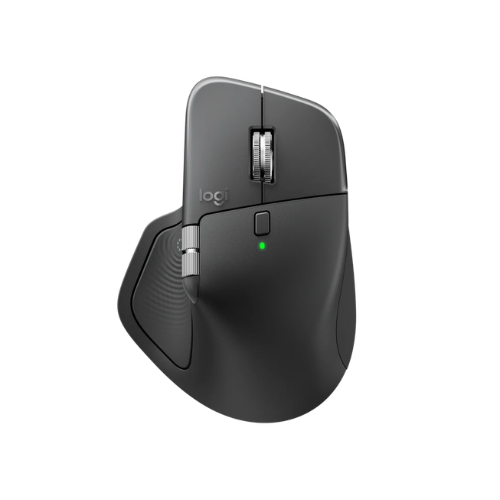
Logitech MX Master 4 Wireless Mouse
Launch Year
2025
Weight
150g
Connectivity
2.4GHz Wireless + Bluetooth
Maximum DPI
8000
Introduction
The Logitech MX Master 4 is a premium wireless mouse designed primarily for office work, productivity, programming, and creative tasks. Its large ergonomic body, eight-button layout, Darkfield High Precision optical sensor, magnetic scroll wheel, and long listed battery life make it an option for users who prioritize comfort and workflow efficiency over competitive gaming.
Its strongest areas are office use (9.5/10), ergonomics (9.5/10), value (9.5/10), comfort (9/10), and productivity (9/10).
At a listed price of $119.99, it is best suited to users who can benefit from its productivity-focused design and features. Its 150 g weight, large dimensions, and gaming score of 4/10 make it less suitable for buyers who want a lightweight competitive gaming mouse.
Logitech MX Master 4: Specifications
| Specification | Details |
|---|---|
| Brand | Logitech |
| Model | MX Master 4 |
| Launch year | 2025 |
| MSRP | $119.99 |
| Current price | $119.99 |
| Availability | Available |
| Weight | 150 g |
| Dimensions | 128 × 88 × 51 mm |
| Weight category | Very Heavy |
| Size category | Large |
| Shape | Ergonomic |
| Handedness | Right |
| Shell material | ABS Plastic |
| Shell finish | Matte |
| Sensor | Darkfield High Precision |
| Sensor type | Optical |
| Maximum DPI | 8000 |
| Maximum polling rate | 125Hz |
| Motion Sync | No |
| Buttons | 8 |
| Main switch Type | Mechanical |
| Scroll Wheel Type | Magnetic |
| Wheel tilt | No |
| Connectivity | 2.4GHz wireless + Bluetooth |
| Wired mode | No |
| Battery | Rechargeable |
| Listed Battery life | 1680 hours |
| Charging | USB C |
| Software | Logi Options+ |
| Onboard memory | No |
| Windows Support | Yes |
| macOS Support | Full |
| Linux Support | Basic |
| RGB Lighting | No |
Design and Build Quality
The Logitech MX Master 4 has a large, right-handed ergonomic design. Its dimensions are 128 mm long, 88 mm wide, and 51 mm high, placing it in the Large size category.
The mouse uses an ABS plastic shell with a matte finish. Its ergonomic shape is intended for users who prefer a contoured mouse rather than a compact, symmetrical gaming design.
Its build score of 9/10, indicating a strong evaluation for build quality.
Its size and shape are important considerations before purchasing. Users who prefer a substantial mouse may appreciate the design, while those who need a compact device for travel or small hands may find it less convenient.
Weight
At 150 g, the MX Master 4 is classified as Very Heavy.
This makes it very different from lightweight gaming mice designed for rapid, repeated movements.
For office and productivity tasks, some users may prefer a more substantial mouse. However, the weight can be a disadvantage if you frequently reposition your mouse or prefer effortless, low-mass movements.
The key question is whether your priority is a productivity-focused ergonomic design or a lightweight mouse built around speed.
Size and Hand Fit
The MX Master 4 is classified as a Large mouse, with hand-fit profile that favors medium and large hands.
| Hand Size | Score |
|---|---|
| Small | 4/10 |
| Medium | 9.5/10 |
| Large | 8.5/10 |
The strongest score is for medium hands, followed by large hands. Small hands receive a considerably lower score.
If you have medium-sized hands and prefer an ergonomic mouse, the ratings suggest that the MX Master 4 is worth considering. Buyers with small hands should pay particular attention to its width, height, and overall shape before purchasing.
Ergonomics and Comfort
| Metric | Score |
|---|---|
| Comfort | 9/10 |
| Ergonomics | 9.5/10 |
| Office Use | 9.5/10 |
Comfort is one of the MX Master 4’s strongest evaluated areas.
The high ergonomic score supports its positioning as a productivity-oriented mouse rather than a compact gaming peripheral.
Its right-handed shape is an important consideration: the mouse is not an ambidextrous, so left-handed users should look for a design that better matches their needs.
If you spend substantial time working at a computer, the MX Master 4’s ergonomic design may be appealing. However, comfort is personal, and the mouse’s large size and 150 g weight should be considered together.
Sensor Performance
The MX Master 4 uses a Darkfield High Precision optical sensor, with a maximum sensitivity of 8,000 DPI.
Its specifications include:
- Maximum DPI: 8,000
- Sensor type: Optical
- Maximum polling rate: 125Hz
- Motion Sync: No
DPI determines the sensitivity setting available to the user. It does not independently measure the overall quality of a mouse for productivity.
The mouse has maximum polling rate of 125Hz, which is much lower than the 1,000Hz figures commonly associated with gaming-focused mice. Combined with the gaming score of 4/10, this reinforces that the MX Master 4 is positioned primarily for work rather than gaming.
Buttons
The MX Master 4 has eight buttons.
A multi-button layout can be useful for users who want additional controls while navigating applications, working with documents, or performing repetitive tasks.
Its productivity score is 9/10, while its programming and creative-work scores are also 9/10. These ratings suggest that the mouse’s controls and overall design are evaluated more favorably for work-related tasks.
Scroll Wheel
Its Scroll wheel is Magnetic with No-Tilt Function
For buyers who frequently navigate documents, spreadsheets, web pages, and other work content, the scroll wheel is an important part of the overall mouse experience.
If side-to-side wheel clicking is essential to your workflow, note that wheel tilt is not available.
Connectivity
The MX Master 4 supports two wireless connection types:
- 2.4GHz wireless: Yes
- Bluetooth: Yes
The wired operating mode is not available, Therefore, buyers should not assume that connecting a USB cable will allow the mouse to operate as a conventional wired mouse.
Bluetooth is useful for compatible devices that support Bluetooth mouse connections, while 2.4GHz wireless provides another connection option.
If you regularly move between compatible computers or devices, having both connection types may be useful. Check the connection requirements of your particular setup before buying.
Battery and Charging
The MX Master 4 has a rechargeable battery, and it lists its battery life as 1,680 hours.
Charging is USB-C Typed.
The recorded battery-life figure is a major part of the mouse’s specification profile. However, it should be verified against the manufacturer’s current documentation before publication, and actual battery life can vary with usage and settings.
The rechargeable design means the mouse does not rely on a replaceable AA or AAA battery.
Office and Productivity Performance
| Use Case | Score |
|---|---|
| Office | 9.5/10 |
| Productivity and Programming | 9/10 |
| Creative Work | 9/10 |
These scores suggest a clear focus on everyday work and specialized productivity tasks. The MX Master 4 may be worth considering if you spend much of your time:
- Working with documents and spreadsheets
- Navigating multiple applications
- Programming
- Performing creative work
- Using a mouse throughout the working day
Software
The MX Master 4 uses Logi Options+ software. Its operating-system support:
| Operating System | Support |
|---|---|
| Windows | Yes |
| macOS | Full |
| Linux | Basic |
This makes Windows and macOS the clearest match Linux support is listed as Basic, so users on Linux should check whether the specific features they need are supported.
It has No Onboard Memory. If retaining settings directly on the mouse is an important requirement for you, this is worth considering.
RGB Lighting
The MX Master 4 is listed as has no RGB lighting.
That may suit buyers who prefer a simple, work-oriented appearance rather than gaming-style illumination.
If customizable RGB lighting is a priority, a gaming mouse may be a better fit. For users focused on office work, programming, and productivity, the absence of RGB may not be a major disadvantage.
Where to Buy?
You can buy this mouse from trusted platform like:
- Logitech’s Official Website
- Amazon
- Other Trusted online platform.
Pros and Cons
Pros
Large ergonomic design.
High ergonomic score of 9.5/10.
Comfort score of 9/10.
Strong office score of 9.5/10.
Productivity, programming, and creative-work scores of 9/10.
Eight-button layout.
Darkfield High Precision optical sensor.
Maximum sensitivity of 8,000 DPI.
2.4GHz wireless and Bluetooth connectivity.
Rechargeable battery with USB-C charging.
Very high battery-life figure.
Logi Options+ software.
Strong value score of 9.5/10.
No RGB lighting for users who prefer a simpler design.
Cons
Heavy 150 g weight.
Large body may not suit small hands.
Right-handed design is not ideal for every user.
Maximum polling rate is 125Hz.
Gaming score is only 4/10.
No wired operating mode.
No wheel tilt.
No onboard memory.
Linux support is listed as Basic.
Premium listed price of $119.99.
Who Should Buy the Logitech MX Master 4?
The MX Master 4 is worth considering if you:
- Primarily use your computer for office work.
- Want an ergonomic right-handed mouse.
- Prefer a large mouse.
- Have medium or large hands.
- Need a mouse for programming or creative work.
- Want both Bluetooth and 2.4GHz wireless connectivity.
- Prefer a rechargeable battery and USB-C charging.
- Value comfort and productivity more than competitive gaming.
Who Should Avoid It?
Consider other options if you:
- Mainly play competitive FPS games.
- Prefer a lightweight mouse.
- Have small hands and prefer compact designs.
- Need wired operation through USB.
- Require a polling rate higher than the 125Hz.
- Need onboard memory.
- Want RGB lighting.
- Prefer a symmetrical or left-handed mouse.
Is the Logitech MX Master 4 Worth?
This mouse has value score of 9.5/10. The mouse is most compelling for buyers who will benefit from its ergonomic shape, multi-button layout, wireless connectivity, and productivity-focused ratings.
However, its price is harder to justify if you mainly need a basic mouse for browsing or competitive gaming. In those cases, a less expensive or more gaming-focused model may be a better fit.
Before purchasing, compare the current price, battery specifications, software requirements, and features against your actual workflow.
Final Verdict
The Logitech MX Master 4 Wireless Mouse is a productivity-focused mouse with a large ergonomic body, eight buttons, a Darkfield High Precision optical sensor, Bluetooth and 2.4GHz wireless connectivity, and USB-C charging.
Its strongest scores are office use, ergonomics, value, productivity, programming, and creative work. Its main trade-offs are the 150 g weight, large size, 125Hz maximum polling rate, lack of wired operating mode, and relatively low gaming score.
Final recommendation: Choose the Logitech MX Master 4 if comfort, ergonomics, and productivity are your main priorities and you prefer a large right-handed mouse. If your primary goal is competitive gaming, a lightweight gaming mouse with a higher polling rate will likely be a more suitable category to explore.