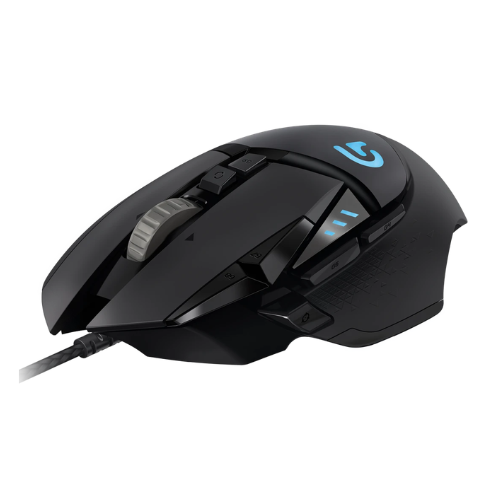
Logitech G502 Proteus Spectrum Gaming Mouse
Launch Year
2016
Weight
121 g
Connectivity
Wired USB Only
Maximum DPI
12,000 DPI
Buttons
11
Introduction
The Logitech G502 Proteus Spectrum is an older gaming mouse that helped establish the G502 as one of Logitech’s most recognizable gaming mouse designs.
Even today, it has an interesting combination of features: an ergonomic right-handed shape, a high-quality PMW3366 optical sensor, plenty of physical buttons, a tilt-enabled scroll wheel and Logitech G HUB software support.
But there is an important catch.
At 121g, the G502 Proteus Spectrum is significantly heavier than the lightweight gaming mice that dominate the market today. So while it can be comfortable and feature-rich, it isn’t the obvious choice for players looking for fast, lightweight mouse movement.
So, is the Logitech G502 Proteus Spectrum still worth buying?
Let’s find out.
Quick Verdict
The Logitech G502 Proteus Spectrum is best suited to users who want a feature-rich, comfortable and heavy ergonomic mouse with plenty of buttons.
Its PMW3366 optical sensor, 11 physical buttons, free-spin scroll wheel and ergonomic shape make it useful for gaming as well as productivity.
However, its 121g weight and older design make it less attractive for competitive FPS players compared with newer lightweight gaming mice.
Good For
- MOBA gaming
- MMO gaming
- Productivity
- Programming
- Large/medium hands
- Users who like heavier mice
- Users who need many buttons
Less Suitable For
- Competitive FPS gaming
- Users who prefer ultralight mice
- Small hands
- People looking for a modern wireless mouse
Logitech G502 Proteus Spectrum Specifications
| Specification | Logitech G502 Proteus Spectrum |
|---|---|
| Brand | Logitech |
| Model | G502 Proteus Spectrum |
| Launch Year | 2016 |
| MSRP | $79.99 |
| Weight | 121g |
| Dimensions | 132 × 75 × 40 mm |
| Shape | Ergonomic |
| Handedness | Right-handed |
| Sensor | PMW3366 |
| Sensor Type | Optical |
| Maximum DPI | 12,000 DPI |
| Tracking Speed | 400 IPS |
| Maximum Acceleration | 40G |
| Maximum Polling Rate | 1000Hz |
| Physical Buttons | 11 |
| Main Switch | Omron Mechanical |
| Scroll Wheel | Free-spin |
| Wheel Tilt | Yes |
| Connection | Wired USB |
| Wireless | No |
| Bluetooth | No |
| Software | Logitech G HUB |
| Onboard Memory | Yes |
| RGB Lighting | Yes |
Design and Build Quality
The G502 Proteus Spectrum follows Logitech’s familiar aggressive ergonomic gaming mouse design.
- Instead of using a simple symmetrical shell, the mouse has a pronounced right-handed shape with multiple contours designed to support the hand.
- The body uses a matte ABS plastic finish, giving it a relatively understated appearance compared with some newer gaming mice.
- The design is also heavily focused on functionality.
- There are multiple additional buttons around the main clicks and thumb area, allowing you to assign shortcuts, macros and in-game commands.
- For someone who only needs two side buttons, this can feel excessive.
- For MMO, MOBA or productivity users, however, those additional controls can be extremely useful.
Build Quality Verdict
Build Quality: 9/10
The heavier construction also contributes to the mouse’s solid feel.
Shape, Size and Comfort
- The G502 Proteus Spectrum is an ergonomic right-handed mouse.
- Its dimensions of approximately 132 × 75 × 40 mm make it a relatively large mouse, especially compared with modern compact gaming mice.
- The shape works particularly well for users who prefer having their palm supported by the mouse.
Fit assessment:
- Small hands: 2/10
- Medium hands: 7/10
- Large hands: 8/10
That makes the G502 Proteus Spectrum much easier to recommend to medium and large-handed users. Small-handed users may find it difficult to comfortably reach all of the buttons.
Weight: The Biggest Weakness
- At 121g, the G502 Proteus Spectrum is a very heavy mouse by modern gaming standards.
- For comparison, many modern gaming mice focus heavily on reducing weight.
- The advantage of the G502’s heavier design is stability.
- A heavier mouse can feel planted on the mousepad and may appeal to users who don’t like extremely light mice.
- The disadvantage is speed, during fast FPS movements, flicks and large swipes, moving a 121g mouse can require more effort than using a lightweight alternative.
Weight verdict
Weight: Very Heavy
If you specifically want a lightweight FPS mouse, this isn’t the mouse I’d recommend.
Sensor Performance
One of the strongest parts of the G502 Proteus Spectrum is its PMW3366 optical sensor.
The sensor offers:
- Up to 12,000 DPI
- Up to 400 IPS
- Up to 40G acceleration
- Up to 1000Hz polling rate
For normal gaming, these specifications provide more than enough tracking capability. The important thing is that you don’t need to run the mouse at 12,000 DPI to benefit from the sensor. Most gamers will use substantially lower sensitivity settings.
Sensor verdict
Sensor Performance: Excellent
The sensor isn’t likely to be the limiting factor in your gaming performance.
Buttons
The G502 Proteus Spectrum has 11 physical buttons. That’s significantly more than a traditional gaming mouse.
This makes the mouse particularly interesting for:
- MMO:- You can assign different abilities and commands to the additional buttons.
- MOBA:- Extra buttons can be useful for abilities, item activation and shortcuts.
- Productivity:- The additional buttons don’t have to be used for gaming.
You can assign actions such as:
- Copy
- Paste
- Browser back
- Browser forward
- Application shortcuts
- Keyboard shortcuts
- Macros
This is one of the biggest reasons the G502 design has remained popular.
Scroll Wheel
- The scroll wheel is another distinctive part of the G502.
- The mouse uses a free-spin scroll wheel with left/right tilt functionality.
- The free-spin functionality can be particularly useful when navigating long documents, spreadsheets or webpages.
- Instead of moving through a long page one click at a time, you can take advantage of the wheel’s faster scrolling behavior.
- For productivity users, this can be surprisingly useful.
Gaming Performance
FPS Gaming
- The G502 Proteus Spectrum has a capable sensor and responsive controls, so it can absolutely be used for FPS gaming.
- However, the 121g weight is the major limitation.
- For casual FPS gaming, the weight may not be a problem.
- For competitive FPS players who frequently make large, fast mouse movements, a lighter mouse is generally more attractive.
FPS score: 9/10
MOBA Gaming
This is where the G502 starts making much more sense.
The combination of:
- Multiple buttons
- Ergonomic shape
- Accurate sensor
- Comfortable design
makes it a strong choice for MOBA games.
MOBA score: 10/10
MMO Gaming
The additional buttons are also useful for MMO players.
Having more commands available directly from the mouse can reduce the amount of keyboard movement required.
MMO score: 9/10
Office and Productivity Performance
- The G502 isn’t limited to gaming.
- Its additional buttons can be extremely useful when working with documents, browsers and other applications.
- For example, you could configure the side buttons for browser navigation or assign custom shortcuts through Logitech G HUB.
- The free-spin scroll wheel can also make long webpages and documents easier to navigate.
- The main downside is the weight.
- If you’re working at a desk for many hours and prefer a lightweight mouse, the 121g design may feel unnecessarily heavy.
Office/Productivity verdict
Very good for productivity, especially if you take advantage of the extra buttons.
Grip Compatibility
The G502 Proteus Spectrum works best with palm and claw grips.
Palm Grip — 8/10
The ergonomic shell provides good palm support.
Claw Grip — 8/10
The shape can also work well with a claw grip, particularly for medium and large hands.
Fingertip Grip — 3/10
The large ergonomic body and 121g weight make it less suitable for fingertip users.
Hand Size Compatibility
| Hand Size | Suitability |
|---|---|
| Small | 2/10 |
| Medium | 7/10 |
| Large | 8/10 |
- If you have small hands, I’d recommend looking at a smaller mouse before choosing the G502 Proteus Spectrum.
- Medium and large-handed users are much more likely to find the shape comfortable.
Logitech G HUB Software
- The G502 Proteus Spectrum works with Logitech G HUB.
- This allows you to customize the mouse and configure its controls.
- You can use the software to configure the additional buttons and create profiles for different games or applications.
- The mouse also supports onboard memory, which is useful if you want certain settings stored directly on the mouse.
Wired Connectivity
The G502 Proteus Spectrum is a wired USB mouse. There is no wireless or Bluetooth connectivity. The advantage is simplicity.
You don’t need to worry about:
- Battery charging
- Wireless interference
- Battery degradation
- Wireless receiver management
The disadvantage is that you’re always dealing with a cable. For a modern gaming setup, some buyers may prefer wireless connectivity.
RGB Lighting
- The G502 Proteus Spectrum includes RGB lighting.
- The lighting adds the typical gaming aesthetic associated with Logitech’s G-series peripherals.
- However, RGB shouldn’t be the main reason to buy this mouse.
- The more important features are its shape, sensor, buttons and scroll wheel.
Pros and Cons
Pros
- Excellent PMW3366 optical sensor
- 12,000 DPI maximum
- 400 IPS tracking
- 40G acceleration
- 11 physical buttons
- Comfortable ergonomic design
- Excellent for MOBA and MMO gaming
- Useful for productivity
- Free-spin scroll wheel
- Scroll-wheel tilt
- Logitech G HUB support
- Onboard memory
- RGB lighting
- Solid build quality
Cons
- Very heavy at 121g
- Not ideal for small hands
- Wired only
- Not ideal for fingertip grip
- Older design compared with newer gaming mice
- Less attractive for competitive lightweight FPS gaming
Who Should Buy the Logitech G502 Proteus Spectrum?
The G502 Proteus Spectrum makes the most sense if you want a large, ergonomic and feature-rich mouse.
It’s particularly suitable for:
- 🎮 MOBA gamers
The numerous buttons make it easier to access commands. - 🧙 MMO gamers
Extra controls can be assigned to abilities and shortcuts. - 💻 Productivity users
The buttons and free-spin wheel can improve navigation and workflow. - 🖐️ Medium and large-handed users
The larger ergonomic shell provides better support. - ⚖️ Users who prefer heavier mice
If you dislike extremely lightweight mice, the 121g weight may actually be an advantage.
Who Should Avoid It?
You should probably look elsewhere if you:
- Want an ultralight mouse
- Play competitive FPS games
- Have very small hands
- Prefer fingertip grip
- Want wireless connectivity
- Want a modern minimalist mouse
Logitech G502 Proteus Spectrum vs Modern Lightweight Mice
The biggest question isn’t whether the G502 Proteus Spectrum is technically capable.
It is.
- The bigger question is whether you want a 121g mouse in 2026.
- Modern gaming mice have increasingly moved toward lightweight designs.
So the G502 Proteus Spectrum appeals to a different type of buyer:
- Choose the G502 Proteus Spectrum if you value features, buttons, ergonomics and stability.
- Choose a lightweight alternative if your priority is fast FPS movement and low weight.
Is the Logitech G502 Proteus Spectrum Still Worth Buying?
- It depends heavily on the price.
- At its original $79.99 MSRP, the mouse offered a strong collection of features.
- But because this is an older model, buyers should be careful about paying a high price for remaining stock.
If you can find it at a reasonable price and specifically want its heavy ergonomic design and large number of buttons, it can still be useful.
If the price approaches newer gaming mice, however, the value proposition becomes much weaker.
Value verdict
Value: 4/10
Final Verdict
- The Logitech G502 Proteus Spectrum is an interesting example of a gaming mouse that prioritizes features and functionality over low weight.
- Its PMW3366 sensor remains capable, the ergonomic shape is comfortable for many medium and large-handed users, and the 11 physical buttons make it particularly versatile for MOBA, MMO and productivity applications.
- The biggest drawback is its 121g weight.
- That’s heavy enough to make the mouse feel noticeably different from today’s lightweight gaming mice, especially during competitive FPS gaming.
Overall
- Recommended for:
MOBA • MMO • Productivity • Medium/Large Hands • Palm/Claw Grip - Not recommended for:
Ultralight Gaming • Competitive FPS • Small Hands • Fingertip Grip
Final rating
4.7/10
FAQ
Is the Logitech G502 Proteus Spectrum good for gaming?
Yes. Its PMW3366 sensor, 1000Hz polling rate and multiple programmable controls make it capable for gaming. Its biggest limitation is the 121g weight.
Is the G502 Proteus Spectrum good for FPS?
It can perform well in FPS games, but its heavy weight makes it less suitable for players who prefer fast, lightweight mouse movements.
How heavy is the G502 Proteus Spectrum?
The mouse weighs 121g.
How many buttons does the G502 Proteus Spectrum have?
It has 11 physical buttons.
Does the G502 Proteus Spectrum have wireless connectivity?
No. It is a wired USB mouse.
Does the G502 Proteus Spectrum support Bluetooth?
No.
Is the G502 Proteus Spectrum good for large hands?
Yes. Its larger ergonomic design makes it better suited to medium and large hands than small hands.
Is the G502 Proteus Spectrum good for palm grip?
Yes. The ergonomic shape and palm support make it well suited to palm grip.
Does the G502 Proteus Spectrum have RGB?
Yes, it has RGB lighting.